I led this study at Sony Electronics as part of our accessibility research program. The goal was to evaluate whether users could find and enable closed captions on Sony carry-over TV models — this mattered because new U.S. legislation requires that captions be easy to activate and customize directly on the device.
TL;DR:
Most participants didn't look for captions where they actually live on Sony TVs. Once they found them, turning them on was easy, but the settings screen confused almost everyone.
Background
New U.S. accessibility legislation established requirements for how TV manufacturers provide access to closed captions. Sony needed to know whether their existing TV models met that standard. I ran a usability study to find out.
My Role
I designed the study, recruited and screened participants, moderated all 7 sessions at Sony's San Diego UX lab, analyzed the findings, and wrote the final report.
Participants
All 7 participants were frequent TV users and frequent CC users. Most had some level of hearing loss. I recruited specifically for this population because the people who rely on captions every day are best positioned to surface real accessibility failures.
Method
We used a Figma prototype of the TV interface controlled by a real Sony remote. I counterbalanced the input order across participants to control for learning effects across the three conditions: over-the-air antenna, streaming apps with MMT, and streaming apps without MMT.
What We Found
Finding captions was the biggest problem. Most participants looked in Quick Settings or the full Settings menu before discovering captions were under a separate MENU button. Three participants needed help from me before finding the right path.
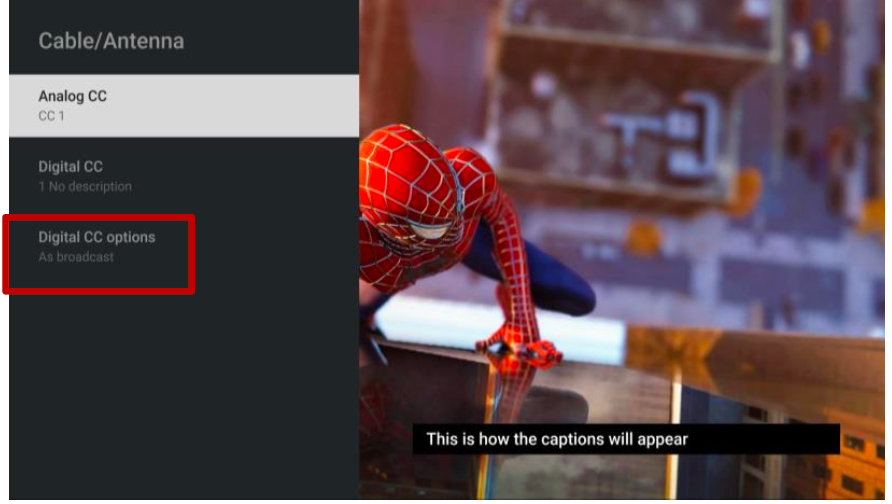
Once participants reached the caption settings screen, the labeling caused a second round of confusion. Terms like "Analog CC," "Digital CC Options," and "As broadcast" didn't mean anything to most people. Participants also felt there were too many screens to click through before they could actually change anything.
After learning where captions lived, everyone was able to turn them on without trouble. The discoverability was the problem, not the feature itself.
Recommendations
- Make the caption activation option more visually prominent
- Add text labels alongside icons
- Reduce the number of screens required to reach caption styling
- Update terminology to plain language
Impact
Findings were used to inform product direction ahead of continued market availability, contributing to the team's response to new U.S. accessibility legislation requirements.